
Why you should use a different email address for every site
This post goes over the benefits of using a different unique email address for each site/service that you sign up for. From preventing spam to protecting your identify online, the positives far outweigh the negatives.
The problem with using the same email address everywhere
Everyone reading this probably has some old email account they created when they started out online that is now completely inundated with spam.
Sound familiar?
I created my first email account with hotmail.com back in the days of MSN. I have long since stopped using this email for privacy reasons, but, even if I did want to continue using the account, the amount of spam it receives would make this unfeasible.
When you use the same email address for everything online, it becomes impossible to identify where spam emails originate from and how the spammers got hold of your information in the first place.
Your email address may have been sold by a deceitful service, or it could have been involved in a data breach for one of the websites you signed up to.
Tip: use haveibeenpwned.com to check if your email address is involved in any known data breaches.
Entering my first hotmail.com account on haveibeenpwnded returns "Pwned on 13 breached sites and found 2 pastes". That is some pretty scary stuff!
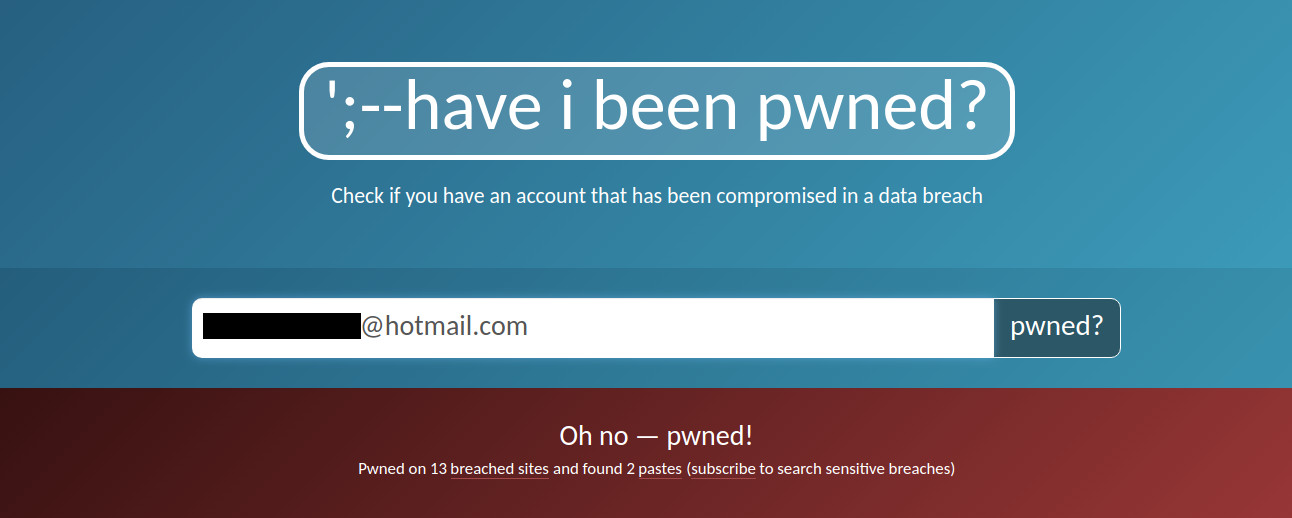
One of the pastes even had my old (and incredibly weak) password right there in plain text! This is how scammers know what your password is when they send you that email claiming they've "hacked your account" whilst demanding $750 in Bitcoin. Just ignore these emails and obviously make sure you are not still using the exposed password anywhere else!
If your email address is involved in multiple data breaches it can be very easy for hackers and bad actors to cross-reference your details and link your information together.
Even worse is if you use the same password all over the place too. A hacker could then try other services (e.g. PayPal) with that same email and password combination, allowing them to potentially gain access to your account.
Tip: use a password manager such as Bitwarden for your accounts, creating a long random unique password for each login.
If you are looking for a fresh start and would like to create a new email address and keep it free from spam you can use a service such as Tutanota, ProtonMail or Posteo.
If you'd like to see other options for password managers of email providers and loads of great privacy advice check out PrivacyTools.io.
The benefits of aliases vs sub-addressing (plus-addressing)
Now let's have a look at how we can solve some of the problems above by instead using a different email address for each site.
One option that is easy to get started with is to use sub-addressing, where you simply add an extension or "tag" to your real email address.
For example: you could use something like johndoe+twitter@example.com for Twitter.
Note: this must be supported by your email provider or it will cause emails to bounce
Many email providers do support these kinds of addresses, and any email sent to the above address will still go to johndoe@example.com.
The main issue with these kinds of addresses is that to an observer it is very easy to identify the real email address.
A script can also be run that strips the extensions from email addresses that are created in the above format.
So if one of your sub-addresses is involved in a data breach, it would be easy to just remove the extension and start sending spam to johndoe@example.com. Now, you would no longer be able to identify where the spam originated or who sold your data.
Another potential downside is that some websites may (incorrectly) deem email addresses containing the "+" symbol as invalid, preventing you from using them.
The advantage of using email aliases instead is that they look exactly like a genuine email address and it is much harder (if not impossible) to try to reverse-engineer them to find out the real email address.
Now let’s explore the benefits of using email aliases that forward to your real email address.
1. Protect your real email address from spam
The most obvious benefit is that using a different email alias for each service helps to protect your real email address from spam.
It does this by essentially "shielding" your real email address from the outside world and prying eyes. Since you only ever give out your email aliases, third-parties do not know your real email address.
This means if your email alias is sold off or involved in a data breach and suddenly starts receiving spam, you can easily turn off or remove the alias in question and the spam will come to a stop.
With addy.io, when an alias is deactivated (turned off), all emails sent to it will be silently discarded by the system. The spammer will not realise that the emails haven't reached you. This will also increment the "blocked email counter" for that alias.
When an alias is deleted, any further emails sent to it will bounce back to the sender with the error message:
"550 5.1.1 Recipient address rejected: Address does not exist".
Another trick that some spam emails do is including a fake "Unsubscribe" link at the bottom of the email that is in fact a trap. By clicking on the link, instead of being unsubscribed, you simply validate the fact that this is an active email account and notify the scammer. The links can also take you to malicious websites and phishing sites.
If you have any doubts on the validity of the "Unsubscribe" link you might be better off simply deactivating or deleting the alias.
2. Identify who has sold your data
Following on from the above point, if you have been giving out a different alias for each site, you can easily identify where spam is coming from by simply looking at the alias address.
If one of your aliases starts to receive spam e.g. twitter@example.com, you can identify that it was Twitter who either sold your private information or was involved in a data breach.
Of course, there is also the chance that someone randomly guessed the alias and sent spam to it. It can therefore be a good idea to add a few random characters to the local part of the email alias when creating it e.g. twitter9218@example.com. This makes it much harder for someone to correctly guess one of your aliases.
I'd recommend using a password manager; password managers can store your login credentials (email/username and password) for all websites, meaning it is easier to keep track of the individual aliases and passwords you have created for each different account.
3. Protect your identity
Using email aliases can be a great way to protect your identity online. Depending on what type of aliases you decide to use it can be very hard for hackers to link your true identity to your email aliases.
This can help reduce the chance of them cross-referencing your accounts in the event of a data breach.
If you are using aliases at a subdomain that is unique to you like with 33mail or addy.io then I would recommend choosing a username that is not linked to you in any way and that you have not used elsewhere online.
You will then be able to create aliases on the fly e.g. alias@username.anonaddy.com (or .me).
Now some users might not like the fact that it is easy for someone looking at these aliases to be able to link ownership of them together as they all sit at the same subdomain.
addy.io also lets you add additional usernames to your account so you can compartmentalise you aliases. This would allow you to have different usernames for work emails, personal emails, etc.
If you would like maximum anonymity, you should consider using a long random local part for your alias and also using a domain name that is shared with other users, allowing you blend into the crowd.
With addy.io you can generate UUID (universally unique identifier) aliases that look something like this:
94960540-f914-42e0-9c50-6faa7a385384@anonaddy.me
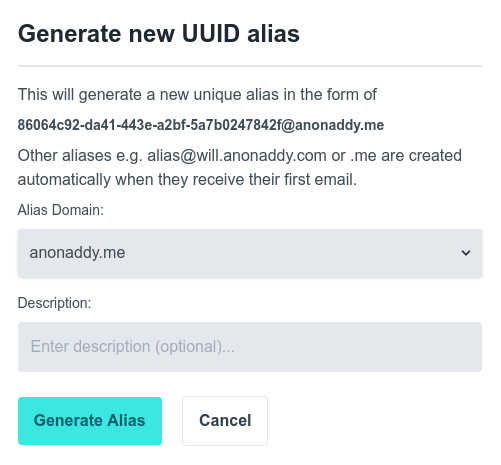
Having an email address similar to that shown in the above example makes it impossible to guess what site/service it has been used for, or identify who it might belong to.
The shared domain is beneficial because many other users will have aliases at anonaddy.me which helps to protect your identity.
If you use UUID aliases it is always a good idea to add a short description (a feature that is included in addy.io) and save it in your password manager so that you do not forget what you used it for.
4. Quickly and easily update where emails are forwarded
Let's say you have one email address that you've been using for every site and service over the years and that one day you are so sick of the spam you decide to start a new email account.
Going through each site and updating your login details or re-subscribing to newsletters with the new email address can be very time consuming.
If you are using a forwarding service with email aliases, you can simply go to your dashboard and update the recipient email address to the new email for all of your aliases. It’s that simple.
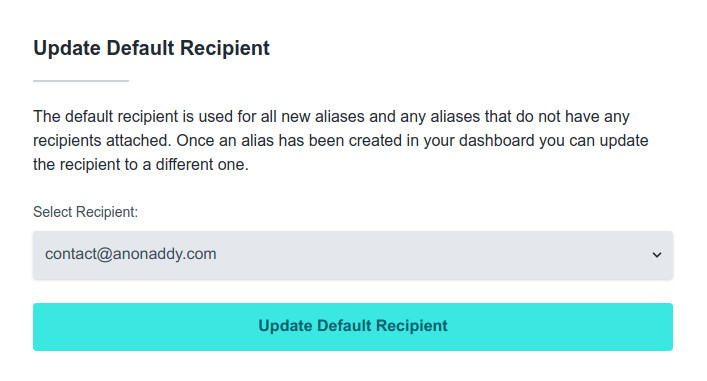
There’s no need to update the emails individually, as they will all simply be forwarded to your new email.
5. Added protection against phishing emails
Phishing emails are sent attempting to appear as though they are from a legitimate company. They are very common with banks and sites like eBay, PayPal and Amazon.
The scammer will send the email and try to make it look as though it has come from e.g. PayPal. The email will encourage you to click on a link in the email that will take you to a login screen on a website they own (or have hacked). They make the website look similar to the real thing, so that if you mistake the website as genuine and enter your login details they will be sent straight to the scammer.
Now obviously the best way to avoid falling for these emails is to learn how to recognise them.
More often than not the emails will start with "Dear Customer" or "Hi you@example.com". This is because they usually don't know your real name, so they instead use something generic. They are also often written with poor spelling/grammar.
Make sure to check the email headers such as; From:, MAIL FROM:, Return-Path:, Reply-To: etc.
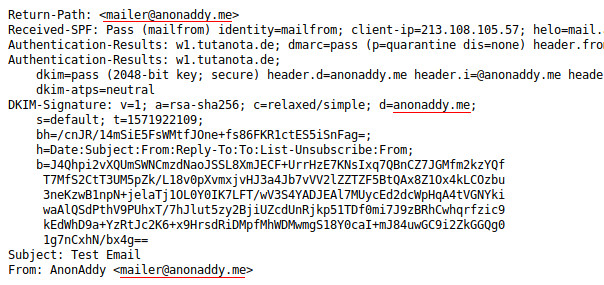
The above screenshot shows an example of strict identifier alignment, the Return Path, From: header and d=domain in the DKIM signature are all the same. If d=domain was a subdomain of the parent domain then this would be relaxed alignment. Notice also the Received-SPF: is a Pass as well as the Authentication-Results: dkim=pass.
Hover over any links and check where they lead to. Also, if the email lands in your spam folder, it is likely that is attempting to spoof a legitimate sender. Check email headers to see if SPF and DKIM checks have passed and if SPF is correctly aligned.
Always use 2FA (TOTP is recommended over SMS 2FA) where available to protect yourself in case you do accidentally fall for one of these emails.
That's all well and good, but want we really want to know is how does using email aliases help protect against phishing emails?
Well, since you've been using a different email for each service, if you receive a phishing email pretending to be PayPal and it doesn't come to your specific alias for PayPal, you can immediately dismiss it as a scam. It is a really useful way of identifying spam emails from the outset.
6. Prevent inbox snooping with GPG/OpenGPG encryption (bonus)
Now this feature obviously depends on what service you are using to forward your emails.
With addy.io, you can generate a GPG/OpenGPG key pair (or use an existing pair) for your email recipient e.g. you@example.com. You can then add the public key to this recipient and enable encryption.
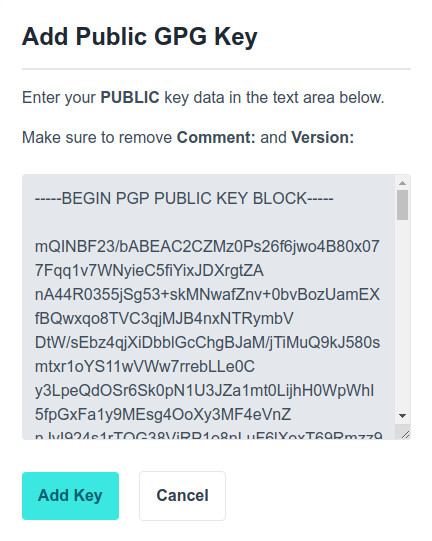
Once you have done this, all emails that are forwarded to you@example.com will be encrypted by addy.io using your public key.
They are also signed by the private key for "no-reply@addy.io". By adding the public key to your keyring, you can verify the email has indeed come from addy.io.
This is great if you are still using an email provider such as Gmail which has been known to snoop on users' inboxes.
If you're on a desktop/laptop, you can use Mozilla Thunderbird plus Enigmail to manage PGP emails. If you have trusted the above key you will see the following information for each forwarded email.

If you're on Android, you can use K-9 Mail with OpenKeyChain (both open-source and found on F-droid) to manage PGP emails.
Potential downsides of using email aliases
There are of course some potential downsides to using email aliases, which we will explore here.
One of those is the added layer of confusion they might add. If you are not using a password manager to save and keep track of all your different aliases, it could be possible to forget which one you have used to sign up for a particular service, which could leave you unable to login.
If you are using a shared domain, another potential downside could be that certain sites and services may start blocking users from signing up with any email address at these domains. Unfortunately there isn't really a solution to this; however, as addy.io allows users to add their own domain names, the problem can be easily avoided. This also protects users from a potential unexpected shutdown of the service you are using. By simply changing your MX records to another email provider, you can continue to receive emails as normal.
Whilst there are a couple of potential downsides, the benefits of using an email forwarding service are far greater.
Feedback and suggestions
If you have any feedback or suggestions please just get in touch and make sure to sign up to the newsletter if you'd like to receive updates on new features!