A different email address for every website
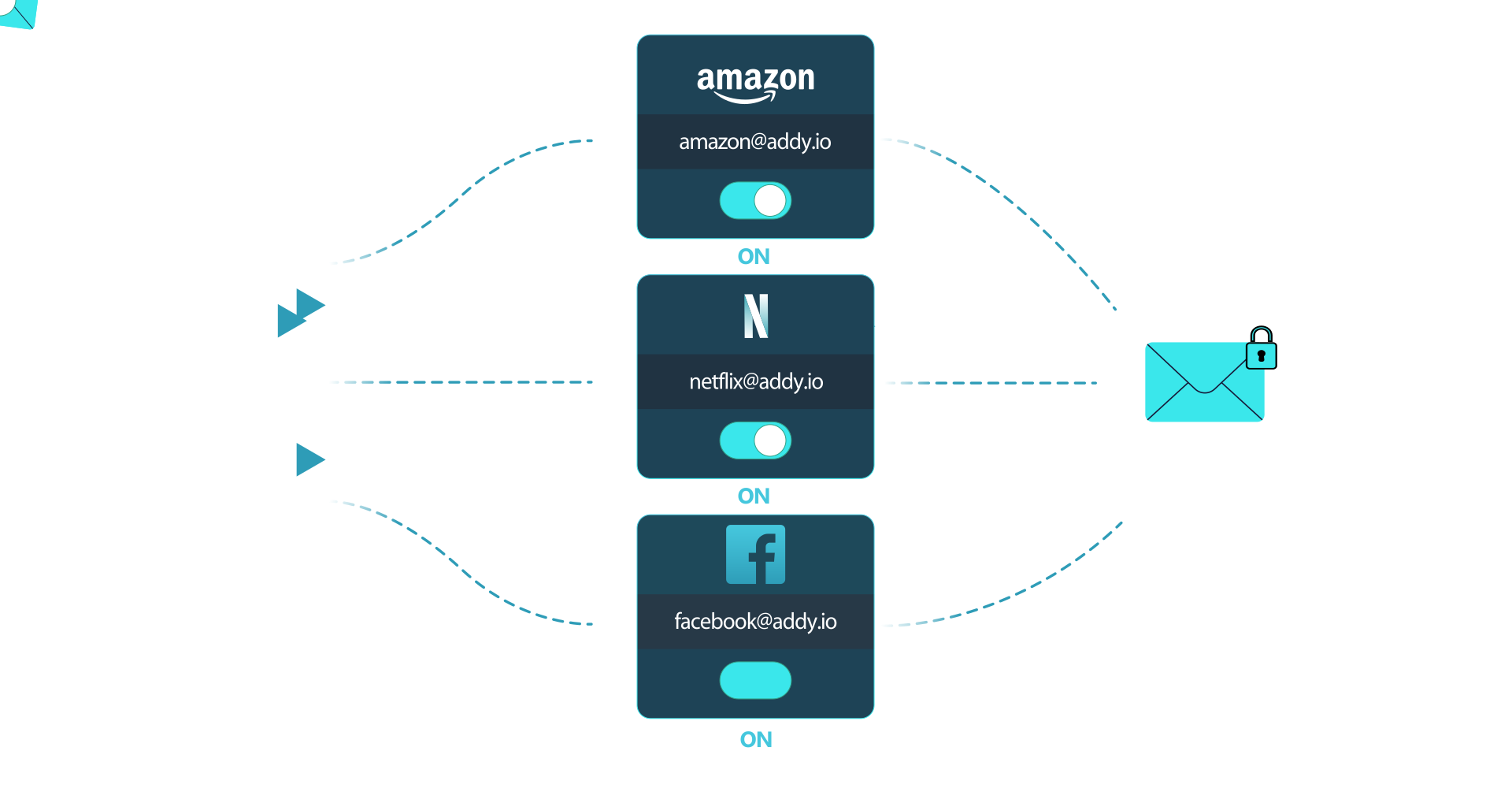
Sign up for things without giving out your real email. Every site gets its own address that forwards to your inbox, and you can switch any of them off in one click.
Set up in three steps
-
1
Choose a username
Pick any username, for example johndoe. You get your own domain: johndoe.anonaddy.com. To stay anonymous, choose one that isn't linked to your real name.
-
2
Give each site its own email
Make one up on the spot. It appears in your dashboard when the first email arrives.
-
3
Turn off what you don't want
If an alias starts getting junk, deactivate it. New mail to it is silently discarded.
Your email address is the key that links every account you own.
A site gets hacked
Your real address ends up on every leaked list.
Only that one alias leaks. Delete it and move on.
Your address gets sold
Spam arrives with no way to tell who sold your address.
You see which alias got the spam, so you know who sold it. Switch it off and the spam stops.
Companies link your profiles
One address ties your accounts together across every site.
Unique aliases can't be matched across sites, and tracking pixels are stripped before mail reaches you.
Everything you need, nothing you don't
Browser extension, mobile apps and your own domain, all managed from one dashboard.
Your alias dashboard
See every alias, how many emails it forwarded, and turn any off in one click.
Browser extension
Create an alias right inside any signup form.
Reply anonymously
Reply and send from an alias. Your real address never appears.
Use your own domain
Bring a domain you own and make aliases on it.
GPG / OpenPGP
Encrypt forwarded emails with your public key.
iOS and Android apps
Manage aliases on the go, with open-source mobile apps.
Blocks tracking pixels
Stops senders knowing when you opened their email. Each email links to a report of what was removed, and your dashboard shows how many were blocked.
Random aliases
One-off addresses like x481n904@anonaddy.me with no username in them.
Additional usernames
Separate work and personal under one account.
Multiple recipients
Send one alias to several real inboxes at once.
Labels
Tag aliases like Shopping or Banking and filter by them.
Rules
Act on emails that match conditions you set: block senders, set labels, rewrite the subject or send a webhook.
Blocklist
Block specific senders or whole domains across all your aliases.
Works with Bitwarden
Bitwarden's generator can create an addy.io alias as it makes your password.
Developer API & webhooks
Automate aliases from code, and trigger a webhook when a rule matches an email.
“Solved my whole spam problem”
“I love this service. Solved my whole spam problem. The developer seems dedicated and passionate about security and privacy.”
 Richard
“I've been using Addy.io for a few years now and it's been absolutely brilliant. Well worth the small amount of money for additional premium features.”
 Grant Marshall
“Great for protecting your real email address. Browser extension works perfectly.”
 Kieran Colfer
“This is a must have tool for all privacy conscious people on the web.”
 Jürgen V.
“Smooth and easy in use. No missing emails. I became a happy paying customer.”
 Dan
Dan“Powerful, and has a gorgeous GUI.”
 Roke Beedell
“Great service. Efficient, customer services fast and easy to use. Kudos.”
 Lorenzo
Free to start. $1 a month to go further.
- ✓ Unlimited aliases on your username
- ✓ 10 random aliases, like x481n904@anonaddy.me
- ✓ Forwards to 1 inbox
- ✓ Alias domains @anonaddy.com and @anonaddy.me
- ✓ 10MB of forwarded email a month
- ✓ Reply and send from aliases
- ✓ Use 1 domain you own
- ✓ More alias domains, including @addy.io
- ✓ Forward to up to 5 inboxes
- ✓ Block tracking pixels
- ✓ Unlimited random aliases
- ✓ Reply and send from aliases
- ✓ Use up to 20 domains you own
- ✓ Forward to up to 30 inboxes
- ✓ Every alias domain, including @addy.io
- ✓ No monthly email limit
Paid plans also include exclusive discounts from privacy partners like Ente, Kagi, Tuta and Windscribe. See all perks →
Before you sign up
Do I need to change my email provider?
No. addy.io forwards to the inbox you already use, whether that's Gmail, Outlook, Proton or any other provider.
Is it really free?
Yes. The free plan includes unlimited standard aliases with no time limit. Paid plans start at $1/month when you want your own domain, replies from aliases and higher limits.
Does addy.io read my emails?
No. Emails are forwarded automatically and aren't stored, unless a delivery fails and you've turned on storing failed deliveries. For extra protection, turn on GPG / OpenPGP encryption so forwarded emails are encrypted with your public key and only you can read them.
Can I reply without revealing my real address?
Yes, on the Lite and Pro plans. Replies and new emails are sent from your alias, so the recipient never sees your real address.
Will forwarded emails end up in spam?
Most forwarded email lands straight in your inbox. Now and then a provider may filter a message, especially when you first start using addy.io. If that happens, mark it as “not spam” so your inbox learns. Our guide shows how for Gmail, Outlook and other providers. If an alias starts getting unwanted email, switch the alias off instead of marking messages as spam, which harms delivery for everyone.
Will websites accept my alias?
Almost all do. A few sites wrongly treat alias services as throwaway email and block their domains. If that happens, try another addy.io alias domain or your own domain, and let us know about the site so we can ask them to allow addy.io.
Am I locked in to addy.io?
No. You can export a list of your aliases at any time. Aliases on a domain you own are fully portable: point the domain somewhere else and they keep working. Aliases on addy.io’s own domains, including your username, only work through addy.io, so use your own domain for anything you might want to move later. addy.io is also open source, so you can run it on your own server.
How is addy.io different from other alias services?
addy.io is independent and open source, so anyone can check how it works or run it themselves. The free plan includes unlimited aliases on your own username, and it works with any email provider on any device. You can also use your own domains, reply from aliases and encrypt forwarded emails with GPG / OpenPGP.
Who's behind addy.io?
addy.io is built and run by Will Browning, an independent web developer in the UK and a long-time advocate for online privacy and open-source software. There's no venture capital funding. Paid subscriptions cover the servers, so the service never relies on ads or selling your data.
Your next sign-up doesn't need your real email.
Free forever plan, no card required.
Get started free