
You can enable encryption for a recipient so that forwarded emails are encrypted (e.g. with your PGP public key) before they are sent to that address. Only someone with the matching private key (you, in your mail client) can decrypt them. This article explains how to add your public key and turn on encryption for a recipient. For terminology, see GPG/OpenPGP Key in Terminology.
Adding your public PGP key
- Log in and go to Recipients in the navigation bar.
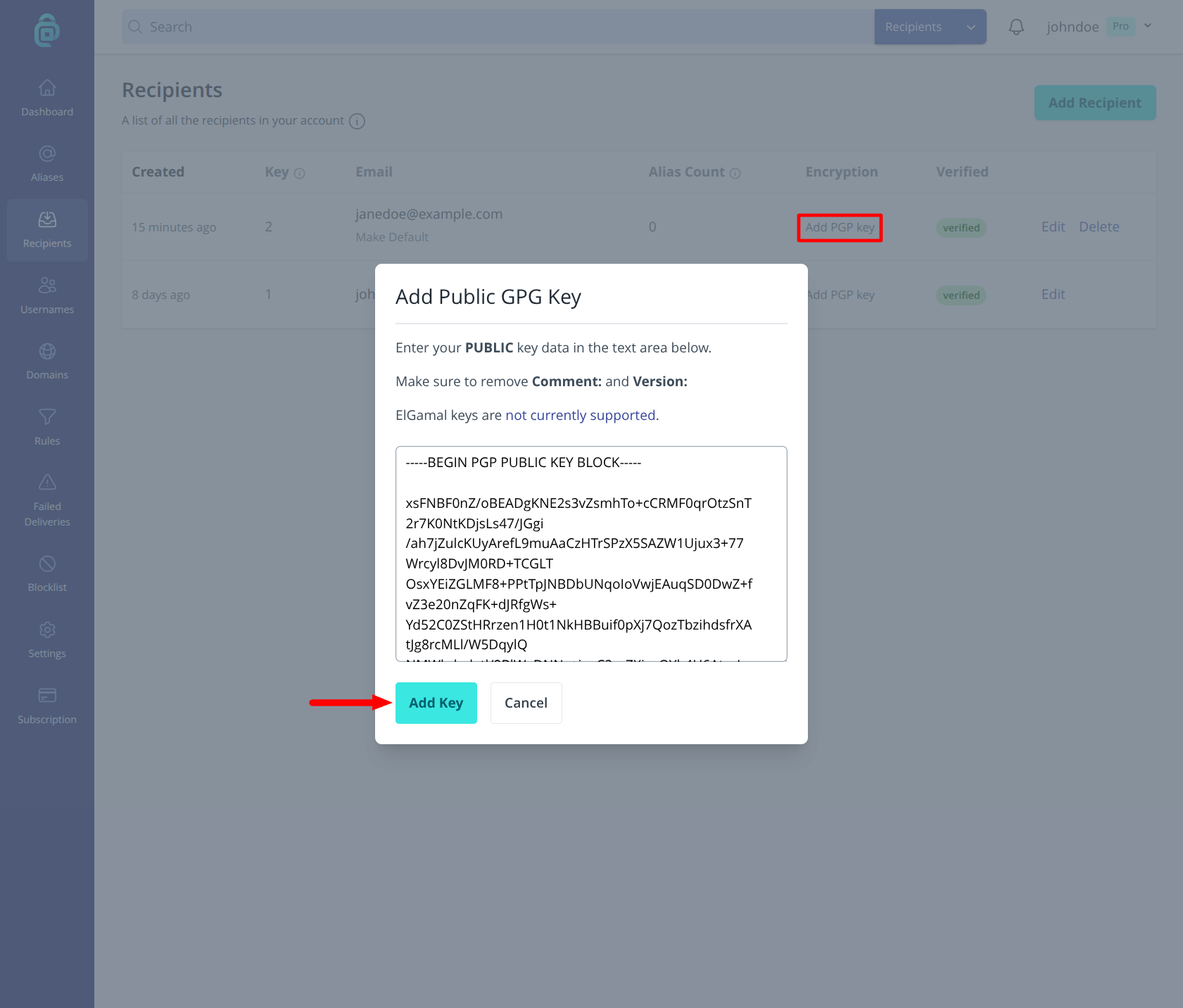
- Click Add PGP key in the "Encryption" column for the recipient you wish to add the key to.
- Paste your public PGP/GPG key (ASCII-armoured format, including the
-----BEGIN PGP PUBLIC KEY BLOCK-----and-----END PGP PUBLIC KEY BLOCK-----lines). Make sure to remove anyComment: addy.io <no-reply@addy.io>lines first. - Click Add Key to save. addy.io will use this key to encrypt forwarded messages to this recipient. Keep your private key secure and never share it; only the public key is stored on addy.io.
Hiding the email subject (protected headers)
When encryption is enabled, you can often choose to hide the subject by using protected headers so the subject line is also encrypted (or removed) instead of being sent in plain text. This avoids revealing the topic of the email to anyone who can see the message in transit. Click "Edit" next to the recipient and then look for the Hide Email Subject option and enable it if you want subject protection.
Inline PGP encryption
addy.io supports inline PGP encryption: the body is encrypted with your public key, and the message is sent in a format that standard PGP-capable mail clients (e.g. Thunderbird with OpenPGP, or ProtonMail) can decrypt. Ensure your mail client is set up to use the private key that matches the public key you added.
Please Note: This will ONLY encrypt and forward the plain text content. Do not enable this if you wish to receive attachments or message with HTML content.
Warnings
- Back up your private key - If you lose the private key, you will not be able to decrypt past or future emails encrypted with that key. Back it up securely.
- Key expiry - If your key has an expiry date, renew it and update the public key on addy.io before it expires so new mail can still be encrypted.
- Testing - After enabling encryption, send a test email to one of your aliases and confirm that the forwarded message arrives encrypted and that you can decrypt it in your client.
- Tracking pixels - addy.io does not change encrypted content, so Block Tracking Pixels does not run on encrypted forwards.
Uncertain digital signature warnings
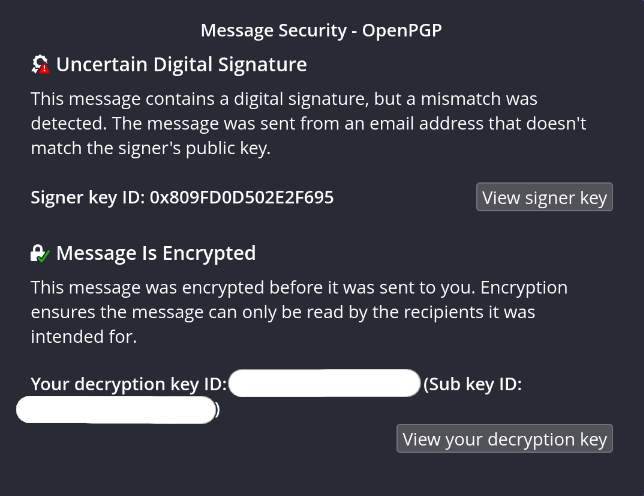
Some email clients (such as Thunderbird) may show a warning like "Uncertain digital signature" on encrypted forwards from addy.io. This happens because the client compares the signing key identity (no-reply@addy.io) with the message From: header, which is set to your alias address.
That mismatch is expected. addy.io signs with the shared no-reply@addy.io key, while the From: address remains the alias so filters and reply behaviour keep working. It is not practical to add every alias as an identity on that key, or to create a separate signing key per alias.
The message can still be encrypted correctly with your public key and decrypted normally. The warning is about identity matching for the signature, not about whether encryption itself failed.
To turn encryption off for a recipient (temporarily or permanently), see Disabling encryption for your recipient.