
Forgetting an alias permanently removes it from your account so it can no longer be restored. For shared domain aliases (e.g. @anonaddy.me), that address can never be used again by anyone. For standard aliases, the address may be created again later (e.g. on the fly if you have catch-all). This article explains when to forget an alias and how it differs from deactivating or deleting.
When to forget an alias
Use Forget when you want to permanently give up an alias:
- You will never use it again and do not want it restorable.
- For shared domain aliases, forgetting frees the address from your account (it will reject mail and cannot be reassigned to you).
- For standard aliases, forgetting disassociates it now; with catch-all enabled, the same address could be created again automatically if someone emails it later.
If you only want to stop mail temporarily, use Deactivate. If you want it gone but might restore it later, use Delete instead of Forget.
How to forget an alias on addy.io
- Log in and go to Aliases.
- Select the alias you want to forget by clicking the checkbox next to it. It can be active, deactivated, or deleted-you can forget a deleted alias to make the removal permanent.
- Click Forget (as shown by the red arrow below). Read the warning: forgetting cannot be undone if it is a shared domain alias.
- Confirm. The alias is then permanently disassociated from your account.
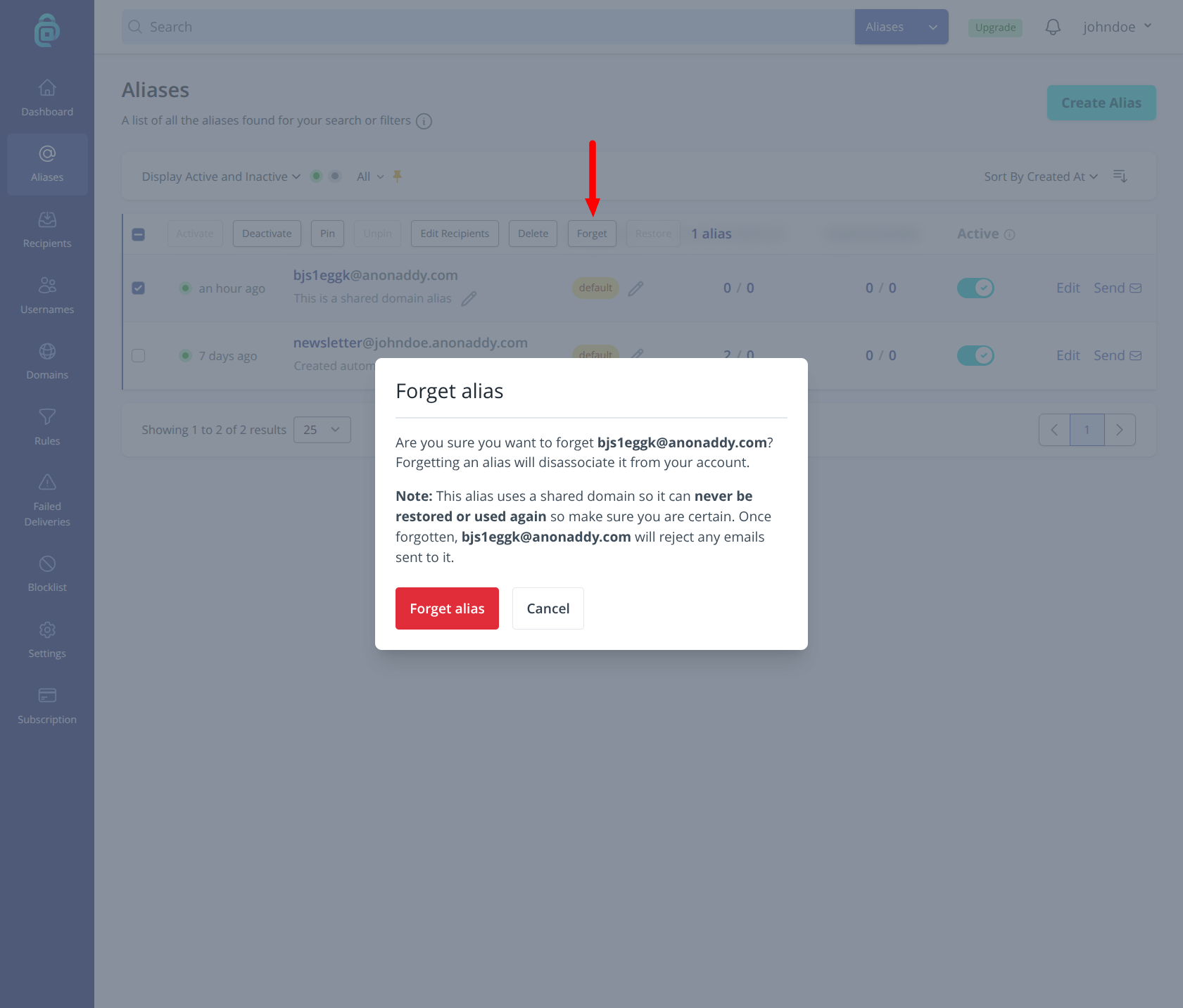
To forget every deleted alias at once, set the filter to Deleted only, then choose Forget all deleted. Enter your password to confirm. Shared domain aliases can never be restored or used again. Standard aliases can be created again later.
Difference between deleting, deactivating and forgetting
- Deactivate - Stops forwarding; mail is silently discarded; you can turn the alias back on. See Deactivating email aliases.
- Delete - Alias is removed and rejects mail; you can restore it later. See Deleting an alias.
- Forget - Permanent. Alias is disassociated from your account. Shared domain aliases can never be restored or used again; standard aliases can potentially be recreated (e.g. via catch-all) as new aliases.