
You can subscribe to addy.io with a credit or debit card or PayPal. Payment is processed by Stripe. Subscriptions renew automatically until you cancel or change them. This article explains how to subscribe with a card or PayPal and where to manage the subscription. For other options, see cryptocurrency, voucher codes, Apple App Store or Google Play.
You can also subscribe to Duo and Family (multi-seat Pro plans) with card or PayPal. Yearly Duo and Family are also available with cryptocurrency. See Duo and Family plans for inviting members, sharing custom domains and managing seats.
How to subscribe with a card or PayPal
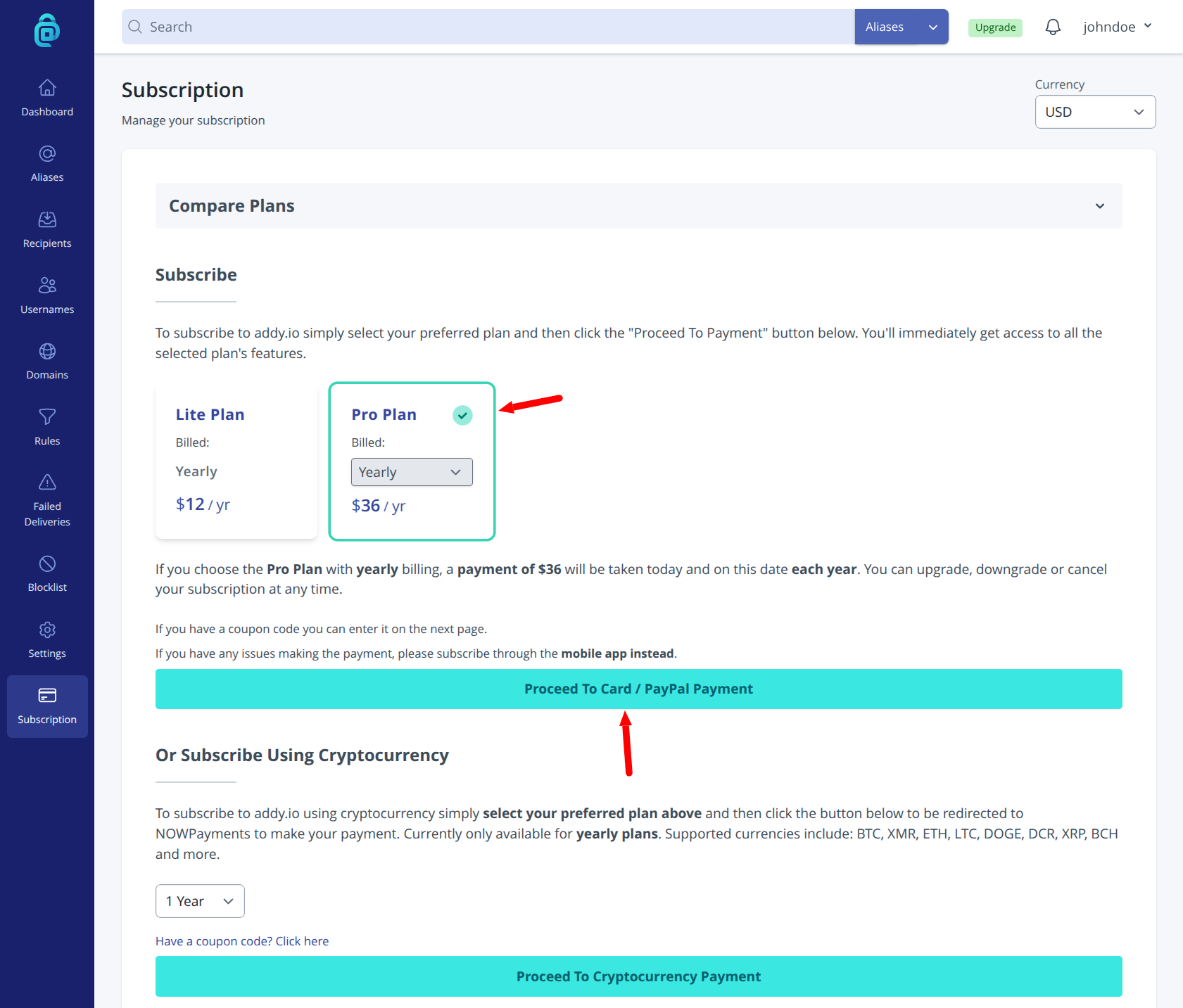
- Log in and go to Subscription in the navigation menu (or open the subscription page directly).
- Choose your plan (e.g. Lite, Pro, Duo or Family) and billing period (monthly or yearly if available) by clicking the plan name (as shown by the red arrow below).
- Click Proceed To Card / PayPal Payment to open Stripe checkout. Enter your card details or sign in to PayPal as prompted.
- After payment succeeds, your account is upgraded. The subscription renews automatically until you cancel. Use Manage Current Subscription on the same page to manage your subscription later. If you chose Duo or Family, open the family plan page to invite members.
Payment and renewal are handled by Stripe. To change the card, cancel, or switch plans, see Managing your subscription.