
Duo and Family let one person pay for full Pro on more than one addy.io account. Each member keeps their own independent account (aliases, recipients, usernames and settings are not shared by default). One owner manages a single subscription and invites others by username. The owner can also optionally share custom domains so members can create their own aliases on a domain the household already uses, and any member can deliver an alias to another member without sharing their email address.
See the pricing page for current prices, or the blog post for an overview of the plans.
Plan sizes
| Plan | Members (including the owner) | Who it suits |
|---|---|---|
| Duo | 2 (you + 1) | Couples or two people who both want Pro |
| Family | 5 (you + 4) | Households or a small group you trust |
Every seat includes the full Pro feature set. You can pay with card or PayPal (monthly or yearly), or with cryptocurrency (yearly only). Duo and Family are not available through the Apple App Store or the Google Play Store.
How to subscribe
- Log in and open the subscription page.
- Choose Duo or Family, and monthly or yearly billing.
- Pay with card or PayPal, or (for yearly plans) cryptocurrency.
- After payment succeeds, open the family plan page to invite members.
For payment steps, see Subscribing with a card or PayPal or Subscribing with cryptocurrency. To change payment method, upgrade, downgrade or cancel the owner's subscription later, see Managing your subscription.
Independent accounts
Duo and Family are not a shared inbox. Each member has their own addy.io account and their own aliases, recipients, usernames and settings. The owner pays; members do not need their own paid subscription while they remain on the plan.
You can optionally share a custom domain (see Sharing custom domains) so the household can use one brand or domain. Aliases created on that domain still belong to each member.
If two people want mail from the same alias, the alias owner can also deliver it to another member (see Delivering aliases to family members). The alias still belongs to one account.
Inviting members
Only the owner can invite people. Members must already have an addy.io account before you can invite them.
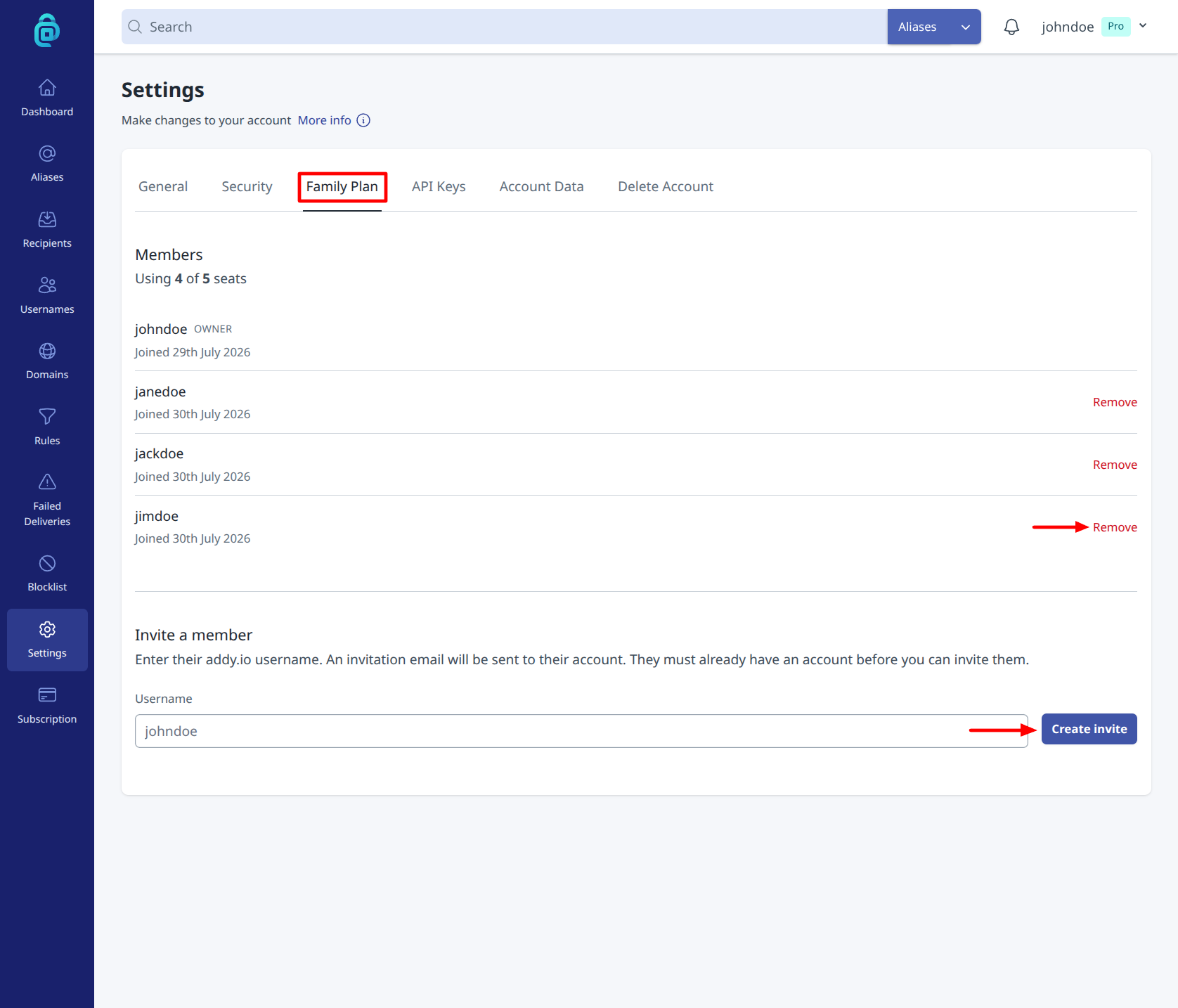
- Go to Settings > Family Plan, or open the family plan page directly (also linked from the subscription page when you are an owner).
- Under Invite a member, enter their addy.io username.
- Click Create invite.
addy.io emails them an invitation. You also get a shareable invite link you can send yourself. Pending invites expire after 7 days; you can Revoke an invite from the same page before it is accepted.
If the person you invite already has a renewing paid subscription, they must cancel it before they can accept. Once cancelled, any unused time on that subscription is lost and does not carry over to the family plan.
You cannot invite yourself, and you cannot invite more people than free seats allow (shown as Using X of Y seats).
Accepting or declining an invite
- Open the invite from the email, or use the shareable link the owner sent you.
- Make sure you are logged in as the invited username.
- If you have your own renewing paid subscription, cancel it first (unused time will not carry over).
- Click Accept invite to join, or Decline to reject the invite.
While you remain a member, your account has full Pro access. You do not manage billing for the family plan; the owner does.
Managing members
On the family plan page, the owner can see who is on the plan and how many seats are used.
- Remove - the owner can remove a member. That person loses Pro access and returns to the Free plan. Aliases they created on shared family domains keep working for 14 days, then are deactivated.
- Leave - a member can leave the plan themselves. Their account also returns to the Free plan, with the same 14-day window for aliases on shared family domains.
- Cancel the owner's subscription - when the Duo or Family subscription ends, the family plan is torn down. Remaining members lose Pro access and return to Free (unless they have another paid subscription of their own). Sharing on the owner's custom domains also ends, with the same 14-day grace period for member aliases.
If you later subscribe again within the usual restore window, see What happens if I have a subscription but then cancel it? for how Free-plan downgrades and restores work on an individual account.
Switching plans
Owners on a card/PayPal subscription can change plan (for example Pro to Duo, or Duo to Family) through Manage Current Subscription on the subscription page, the same way as other Stripe plan changes. See Managing your subscription. Seat limits update with the plan; if you move to fewer seats than you currently use, excess members may need to be removed.
Sharing custom domains
The owner can optionally share a verified custom domain with Duo or Family members. Sharing is off by default and controlled per domain with a toggle. Members can then create their own aliases on that domain (for example bank@yourdomain.com on one account and shop@yourdomain.com on another) while each person's aliases, recipients and settings stay private.
This is useful when a couple or household already owns a domain and wants everyone to use addresses at that domain, without sharing a single addy.io inbox.
What members get
- Create and manage their own aliases on the shared domain
- Use their own recipients, labels and other alias settings
What stays with the owner
- DNS for the domain
- Catch-all and alias auto-create
- Domain settings (active, default recipient, description)
- The ability to turn sharing on or off
Members see shared domains as read-only on the Domains page (labelled Shared by the owner). The owner still controls DNS, so members should treat a shared custom domain differently from addy.io aliases.
How to share a custom domain
- Subscribe to Duo or Family and add and verify the domain if you have not already.
- Go to Domains and click Edit on the verified domain.
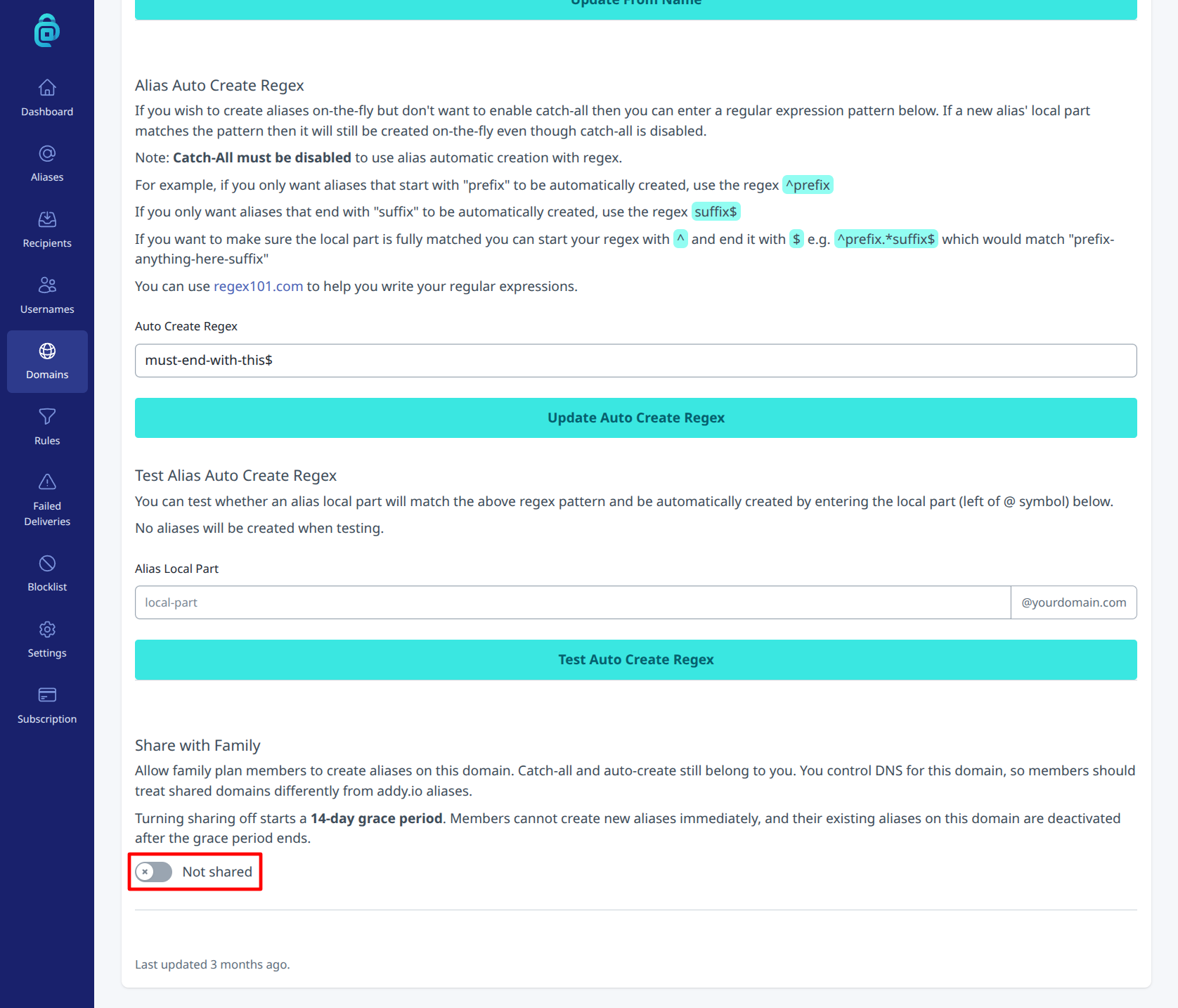
- Turn on the Share with family toggle.
The domain then shows as Shared with family members. Members can create aliases on it from the usual Create Alias flow. They can also see the list under Settings > Family Plan > Shared custom domains.
How to stop sharing a custom domain
- Go to Domains > Edit on the domain.
- Turn off the Share with family toggle.
- Confirm Stop sharing.
Members cannot create new aliases on that domain immediately. Existing member aliases keep working for 14 days, then are deactivated. The same 14-day window applies if a member leaves, is removed, or the family plan ends.
You cannot delete the domain while family members still have aliases on it. Stop sharing first and wait for the grace period to end, or ask members to delete their aliases.
Delivering aliases to family members
Any person on a Duo or Family plan (the owner or a member) can have one of their aliases also delivered to another person on the plan. For example, a couple can both receive mail sent to utilities@yourdomain.com.
You do not need to add the other person's email address as a recipient on your account. addy.io does not let two accounts use the same recipient address, so if you try this you get an error that the recipient already exists. Deliver the alias to them instead.
The copy goes to the other person's default recipient. Their email address stays hidden from you, and your aliases and settings stay hidden from them.
How to deliver an alias to a family member
- Go to Aliases.
- Open the recipients for an alias: when you click Create Alias, when you click the "pencil" edit icon to change the recipients, or when you select up to 25 aliases to edit them all at once.
- In the recipients list, choose the person by their username. Other people on your plan show below your own recipients.
- To let them reply and send from those aliases, turn on Allow reply and send. Leave it off and they can only receive mail.
- Save your changes.
The other person gets one email that tells them which aliases now deliver to them. If you add them to many aliases at once, the email lists all of them.
If you edit the recipients for more than one alias at once, the recipients you choose replace the recipients on every selected alias. The Allow reply and send checkbox applies to every selected alias.
Forwarding with a rule
You can also send only some emails to a family member, instead of every email to an alias.
- Go to Rules and create a rule. See Creating a new rule.
- Set the conditions for the emails you want to send on.
- Add a Forward to action and choose the person by their username.
- Turn on Forwards and save the rule.
A matching email goes to the people you select in that action, instead of the alias recipients. Their email address stays hidden. The limit of 25 aliases does not apply to a rule.
If the person leaves the plan, or they change their default recipient, the rule stops sending to them until you choose them again. You can do this only in the web app.
Limits
- One alias can have at most 10 recipients in total. Family members count towards this limit.
- One person can receive copies of at most 25 aliases from the other people on the plan.
- The other person must have a verified default recipient.
- At this time, you can choose family members only in the web app. The mobile apps show them in the recipients list as "username (family member)".
Stopping delivery of an alias
If an alias is delivered to you, you can see it under Settings > Family Plan > Aliases also delivered to you. Click Stop delivery to stop getting copies of that alias. The alias owner can also remove you from its recipients at any time.
Delivery stops for everyone automatically when a member leaves, is removed, or the family plan ends.
What family members can and cannot do
The alias still belongs to the person who created it. If an alias is delivered to you:
- You cannot reply or send from it unless the alias owner turns on Allow reply and send for you on that alias. The switch is off until they turn it on. Sharing a domain, or a Forward to rule, does not turn it on. The send uses their limit and their rules. You still cannot change the alias.
- Your copy does not include the addy banner, so it has no Deactivate or Block actions. A spam warning still shows when the owner uses that warning. One-click unsubscribe in your email client does not deactivate or delete the alias.
- Only the alias owner's rules apply. If a rule blocks an email, nobody gets a copy. A rule that forwards to other recipients does not remove family members.
- Your recipient's encryption settings still apply. The owner's banner setting applies only to their own copy.
- Mail to the alias goes to the default recipient you had when you were added. If you later change your default recipient, ask the alias owner to remove you and add you again.
If a copy cannot be delivered, the alias owner sees it on their failed deliveries page as Family member, without your email address.
Common questions
Can members see each other's aliases? No. Accounts stay independent. Even on a shared custom domain, each member only sees the aliases they created. The only exception is when someone delivers an alias to you: you can then see that alias address on your family plan page.
My partner and I both want to receive the same alias. Can I add their email address as a recipient? No. A recipient address can only belong to one account, so addy.io shows an error that the recipient already exists. If you are both on the same Duo or Family plan, deliver the alias to them instead.
Can members share a custom domain? Yes. The owner can optionally share a verified custom domain with the plan. Sharing is off by default and controlled per domain. See Sharing custom domains.
Can I invite someone who is still on Free? Yes. They only need an existing addy.io account. Free users can accept without cancelling anything.
Can I pay with crypto or through the mobile apps? Crypto works for yearly Duo and Family plans - see Subscribing with cryptocurrency. Duo and Family are not available through the App Store or Play Store; use card or PayPal or crypto on the web.
Where do I manage seats after subscribing? Settings > Family Plan, or app.addy.io/settings/family-plan.