You can send a new email from an alias, not only reply to a forwarded message. That lets you start a conversation without receiving mail first. You compose the email in your usual email client, send it from a verified recipient, and put a special address in the To field so addy.io knows which alias to use and who should receive the message.
Sending from an alias requires a Lite or Pro subscription. It is not included on the Free plan.
This article explains what you need before sending, how the address format works, how to use Send from in the web app, how to confirm a message was sent, and what to do if something goes wrong.
Before you send
Make sure the following are in place:
- Plan - Sending from an alias requires a Lite or Pro subscription (not available on the Free plan). See pricing and Why are some features paid only?.
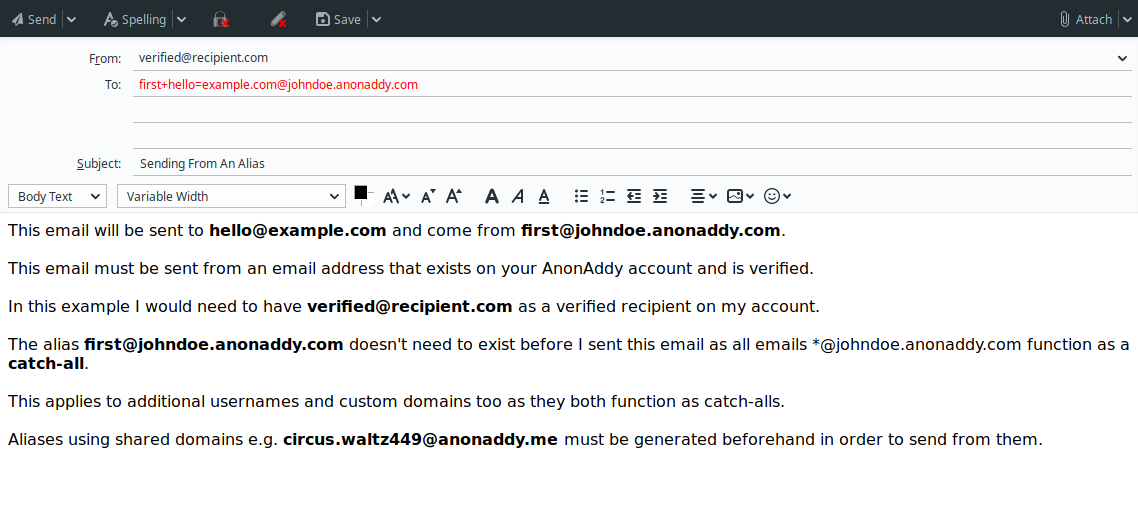
- Verified recipient - You must send the email from a verified recipient address on your addy.io account. If you send from another address, the message will not be sent from your alias and will instead be forwarded back to you as if from an external sender.
- Reply/send allowed - That recipient must be allowed to reply and send from your aliases. This is enabled by default.
- Alias exists (or can be created) - The alias must already exist, or you must be able to create it when the message is sent (see Standard vs shared-domain aliases below). If the alias has been deactivated or deleted, sending will fail until you restore or reactivate it.
How to send a new email
- Compose a new email in your email client or webmail (not a reply to a forwarded message).
- Set From to your verified recipient address (the inbox you use with addy.io).
- In the To field, enter the special send-from address for your alias and the person you are emailing (see How the send address works below).
- Write your subject and message, then send as usual.
addy.io receives the message, sends it from your alias, and delivers it to the recipient. They see your alias in the From field, not your recipient address.
How the send address works
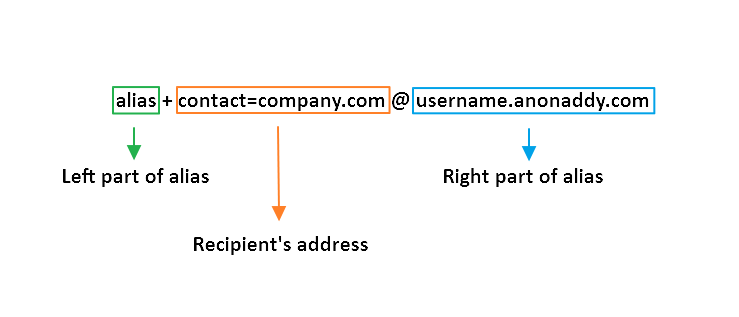
The To address encodes which alias you are sending from and who should receive the email. It uses the same format as replying.
For example, if your alias is shop@johndoe.addy.io and you want to email hello@store.com, enter this in the To field:
<shop+hello=store.com@johndoe.addy.io>
In this example:
- shop@johndoe.addy.io is the alias you are sending from
- hello@store.com is the person who will receive your message
addy.io decodes the address and delivers your email to hello@store.com from shop@johndoe.addy.io.
Addresses with a plus extension
If the destination address contains a plus extension (for example hello+whatever@example.com), include it in the encoded address:
<first+hello+whatever=example.com@johndoe.anonaddy.com>
Standard vs shared-domain aliases
| Alias type | Sending behaviour |
|---|---|
Standard (e.g. @johndoe.anonaddy.com, custom domains) |
You can often send from an alias that does not exist yet if catch-all is enabled for that username or domain. The alias is created when the first message is sent. |
Shared-domain (e.g. @anonaddy.me) |
You must create the alias in advance. You cannot send from a shared-domain alias that has not been generated. |
This also applies to additional usernames and custom domains. See What are the different kinds of aliases? for more.
Using Send from in the web app
You do not have to build the address yourself. In the addy.io dashboard, go to Aliases, click Send from next to an alias, enter the destination email address, and addy.io shows the correct To address to use in your email client.
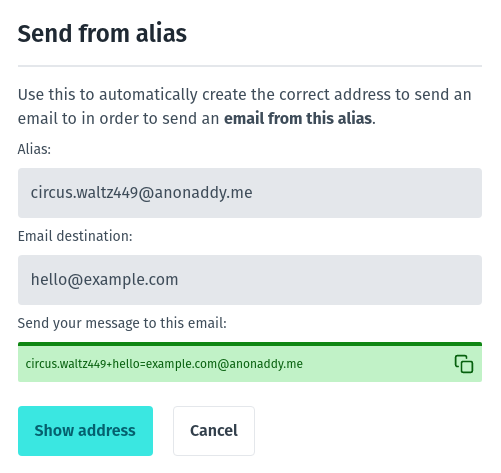
You can use Send from to create a standard alias on the fly when catch-all is enabled, or when using a custom domain configured as catch-all. It does not create shared-domain aliases for you; those must exist before you send.
You can also get the correct address to send to in the browser extension or mobile app.
Will the recipient see my real email?
No. The message is sent from your alias; your verified recipient address is not shown to them.
Your email client's Sent folder will still show your real (verified recipient) address as the From address. This is normal. You send the message from that inbox to the addy.io mail server. addy.io then sends it on from your alias to the destination. The person who receives the email sees only your alias in the From field, not your real address.
Avoid putting identifying details in the message body or signature (such as your real name or personal email) if you want to stay anonymous. See the FAQ (the same applies to sends and replies).
Check that your email was sent
In the addy.io dashboard, go to Aliases and find the alias you sent from. If the message was handled successfully, the sent count for that alias will increase.
If the count does not change, see Having trouble sending? below.
Attachments and size limits
You can include attachments when sending from an alias. Attachments count towards your bandwidth. The maximum message size is 25 MB including attachments. See the FAQ and FAQ.
Encrypted sends
If you use GPG/OpenPGP, you can encrypt messages you send from an alias. See Sending an encrypted reply/send from an alias and Encrypting a reply/send with the addy.io public key. addy.io removes attached public keys and signatures from outbound messages so you do not accidentally expose your real identity.
Having trouble sending?
The same issues can affect sends and replies. See Having trouble replying? for full detail, or the summaries below.
The message comes back to me instead of the recipient
You are probably sending from an address that is not a verified recipient on your account. Check your email client's Sent folder and confirm which address it used. See the FAQ.
The message is rejected
If you see 550 5.1.1 Recipient address rejected: Address does not exist, the alias may have been deleted or does not exist yet (and catch-all is not enabled). Restore or create the alias before sending.
If you receive "Attempted reply/send from alias has failed", your verified recipient's domain may not pass DMARC checks. See the FAQ.
I used Send from but my client changed the To address
Some email clients rewrite or "correct" unusual addresses. Paste the address from addy.io exactly into To, and check Sent to confirm what was actually used.
Related articles
- Replying to email using an alias - reply to a forwarded message instead of starting a new one
- Creating new email aliases - generate shared-domain aliases before sending
- Understanding catch-all for a username - allow on-the-fly alias creation when sending
- Allowing or disallowing a recipient to reply/send
- Updating an alias display from name - change the name recipients see when you send