
A failed delivery is any email event where addy.io cannot complete normal delivery processing, either because forwarding to your recipient fails (outbound bounce), an inbound message is rejected before acceptance (inbound rejection), or an inbound message is accepted but quarantined as spam (inbound quarantined). addy.io records these so you can review the reason, view or download stored messages when available, and fix the issue - for example by updating a recipient address, freeing mailbox space, or resolving sender authentication problems. See Terminology for the short definition. This article explains each failed delivery type and common reasons they occur.
The different types of failed deliveries
There are three different types of failed deliveries on addy.io:
- Outbound bounces - These occur when addy.io attempts to forward an email but the destination mail server rejects it (e.g. recipient mailbox full).
- Inbound rejections - These occur when the addy.io mail servers reject inbound email from senders that fail basic security checks (e.g. the sender's email provider could not prove the message was genuine).
- Inbound quarantined - These are emails detected as spam by filtering software on the addy.io mail servers (e.g. blacklisted sending IP address, high spam score).
The failed deliveries page shows all three types and the reason each one failed. You can hide some expected inbound rejections. See Hiding rejections you already chose.
Outbound bounces and inbound quarantined messages are temporarily stored if you have this setting enabled in your account.
Inbound rejections are not stored because they are never accepted by the addy.io mail servers.
Common causes by failed delivery type
Outbound bounces - common causes
These happen after addy.io has accepted inbound mail and then tries to forward it to your recipient inbox (or a destination inbox when you send/reply from an alias).
- Recipient mailbox full - The destination mailbox has exceeded its storage limit, so the destination server rejects the forward.
- Recipient address invalid - The recipient address on your account is incorrect, no longer exists, or has a typo.
- Recipient server policy rejection - The destination provider may apply local policies (content, attachment type, rate limits, temporary blocks, or strict filtering) and reject the message.
- Temporary server issue - The destination provider may be temporarily unavailable or overloaded, causing a temporary bounce.
- Temporary rate limiting - Your email provider may defer forwards with a 421 4.7.28 response while addy.io retries. The message can arrive hours later and may not appear as a failed delivery if it eventually succeeds. See Why are forwarded emails delayed?.
What to do:
- Confirm your recipient address is correct and still active.
- Free up space in the recipient inbox if it is full.
- Try resending later for temporary failures.
- If one recipient keeps rejecting, change the alias recipient or add another verified recipient.
Inbound rejections - common causes
These happen before addy.io accepts the message. The sender's server or domain fails basic checks, so the message is rejected during SMTP.
Below are common inbound rejection examples and what they usually mean:
554 5.5.2 Helo command rejected: need fully-qualified hostname- The sending server introduced itself in SMTP HELO/EHLO with an invalid name (for examplelocalhost, a short host name, or a non-FQDN value). Receiving servers expect a fully-qualified host name such asmail.example.com.554 5.7.1 Helo command rejected: Host not found- The host name given in HELO/EHLO does not resolve in DNS (A/AAAA record missing or broken). The sending server claims a host identity that cannot be looked up.554 5.7.1 Client host rejected: cannot find your reverse hostname- The sending IP has no valid reverse DNS (PTR) record, or the PTR is misconfigured. Many mail servers require reverse DNS to reduce spam and bot traffic.554 5.1.8 Sender address rejected: Domain not found- The sender envelope domain (MAIL FROM / return-path domain) does not exist in DNS (no valid MX or A record, or typo/non-existent domain), so it cannot receive bounces and fails basic legitimacy checks.
Why these are rejected:
- They are common signs of misconfigured or low-quality mail infrastructure.
- Correct DNS and SMTP identity checks help block spoofed, abusive, or non-deliverable mail before acceptance.
- If addy.io accepted this mail, downstream forwarding failures and abuse risk would increase.
Who can fix this:
- These are sender-side issues. The sender's mail provider or server administrator must fix hostnames and DNS records.
- As an addy.io user, you cannot correct these from your account settings.
Hiding rejections you already chose
Some inbound rejections are expected. You already stopped the email. These include:
- A deactivated alias, username, or custom domain
- A deleted alias
- A sender on your blocklist
Show Intentional Failed Deliveries in General settings controls whether those rows appear. The default is Shown. Choose Hidden to remove them from the Failed Deliveries page, the API list, and the dashboard chart.
addy.io still rejects the emails. The rows are kept for 7 days, so you can show them again. A direct link to one row still opens it.
This setting does not hide outbound bounces, inbound quarantine, or the sender security checks above.
Inbound quarantined - common causes
These messages are accepted by addy.io but classified as spam by filtering and placed in quarantine.
- High spam score - Message content, headers, links, or sending patterns score as likely spam.
- Sender listed on blocklists - The sending IP or domain appears on one or more reputation blocklists (for example Spamhaus). This is a common reason for quarantine notices that mention a listed sending IP.
- Authentication failures - SPF, DKIM, or DMARC checks fail or look suspicious in context.
- Reputation or policy signals - Sender behaviour matches known abuse patterns (bulk signups, phishing-like content, malicious links, or poor sending reputation).
Passing SPF, DKIM, or DMARC does not guarantee delivery. Authentication checks whether a message is allowed to use a domain. Blocklists and spam scores measure reputation and risk. A message can authenticate successfully and still be quarantined if the sending IP is listed or other spam signals are strong. That can also affect legitimate transactional or security emails (order confirmations, one-time codes, account recovery) when the sender's mail infrastructure is listed or misconfigured.
What to do:
- Review the failed delivery details to identify the filtering reason (for example a listed sending IP).
- View or download the stored message if you need the content (for example a purchase receipt or verification code). Treat downloaded quarantined mail carefully - it may still contain malicious links or attachments.
- For legitimate senders, ask them (or their mail provider) to fix the listed IP, improve reputation, and verify SPF, DKIM, DMARC, PTR, and HELO/EHLO setup.
- Do not contact support asking to "mark as safe" or force-forward quarantined mail. See Why can't quarantined emails be released or marked as safe? below.
- Do not whitelist obviously abusive senders. If needed, report abuse using Report abuse.
There is no account setting to disable inbound quarantine. Filtering protects shared addy.io mail servers and delivery for every user.
Why can't quarantined emails be released or marked as safe?
addy.io is an email forwarding service, but it also operates mail servers that send on behalf of many users. Quarantined messages are held because filtering judged them high risk. They cannot be released, "marked as safe", or resent through addy.io for the following reasons:
- Sending reputation - When addy.io forwards mail, recipient providers (and blocklist operators) judge the addy.io sending IPs, not only the original sender. Forwarding mail that was already flagged as spam - including messages from IPs listed on Spamhaus or similar lists - can cause addy.io mail server IPs to also be listed.
- Impact on all users - A listing or reputation hit on addy.io servers would reduce deliverability for everyone, not only the person who wanted one quarantined message released.
- False positives are still high risk to forward - Occasional false positives happen. Legitimate emails can be quarantined when a sender's IP is listed. That is frustrating, but releasing those messages through addy.io would still mean transmitting mail that spam filters and blocklists have already associated with abuse risk.
- No per-user override - Allowing users to force-forward or permanently trust quarantined senders would create a path for spam and phishing to leave addy.io servers under user control. That path is not offered, because it would undermine the reputation protection above.
What you can do instead:
- Download or view the quarantined message from Failed Deliveries when storage is enabled, so you can still read important content without addy.io forwarding it.
- Contact the sender or their provider so they can delist / repair their mail setup. Once their IP or domain is no longer listed and reputation improves, future messages are more likely to forward normally.
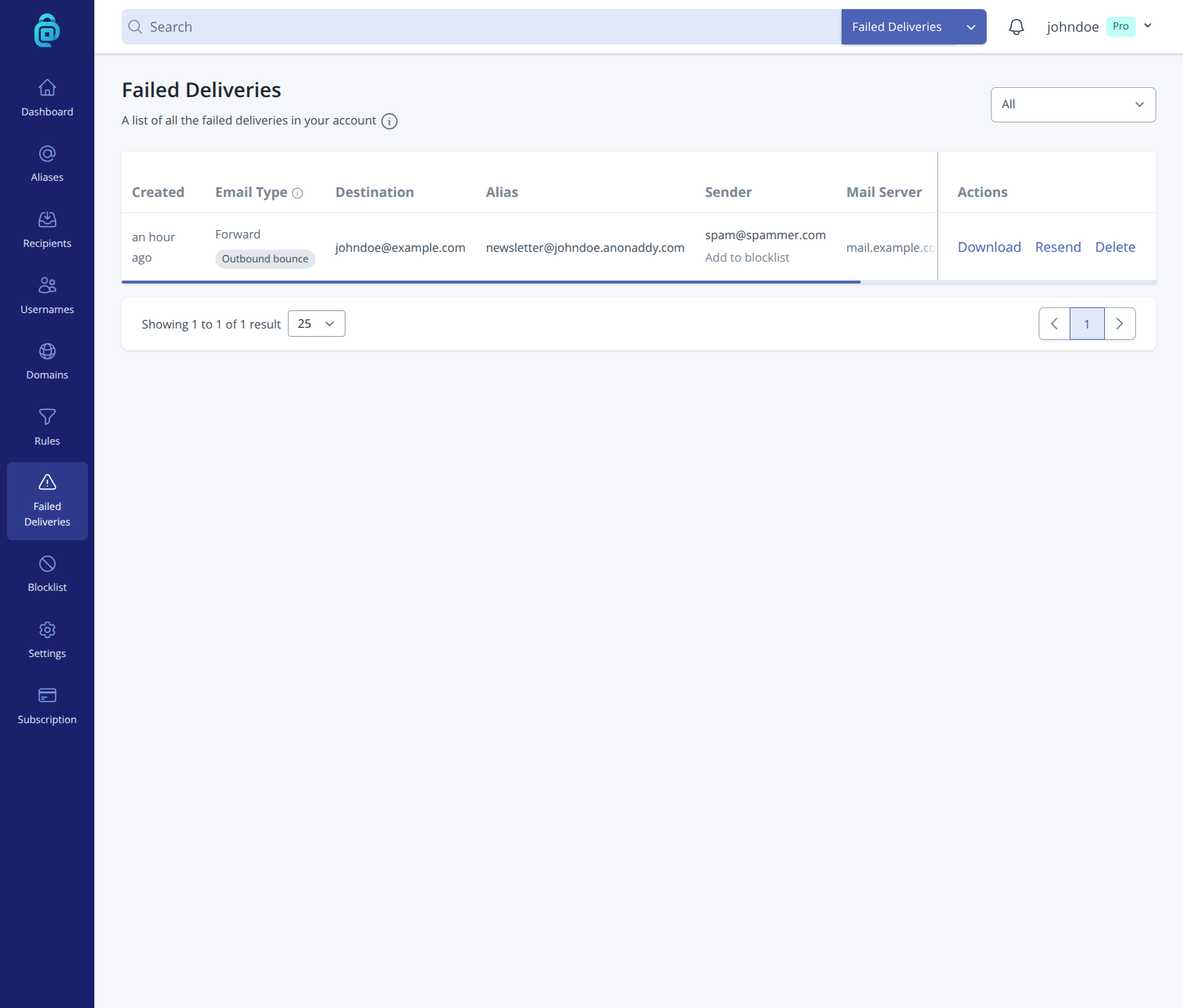
addy.io stores failed deliveries so you can inspect the error and the message. You can download and view them, resend after fixing the issue (outbound bounces only), or delete them from the list. To reduce future failures, see How can I prevent or reduce failed deliveries?.